
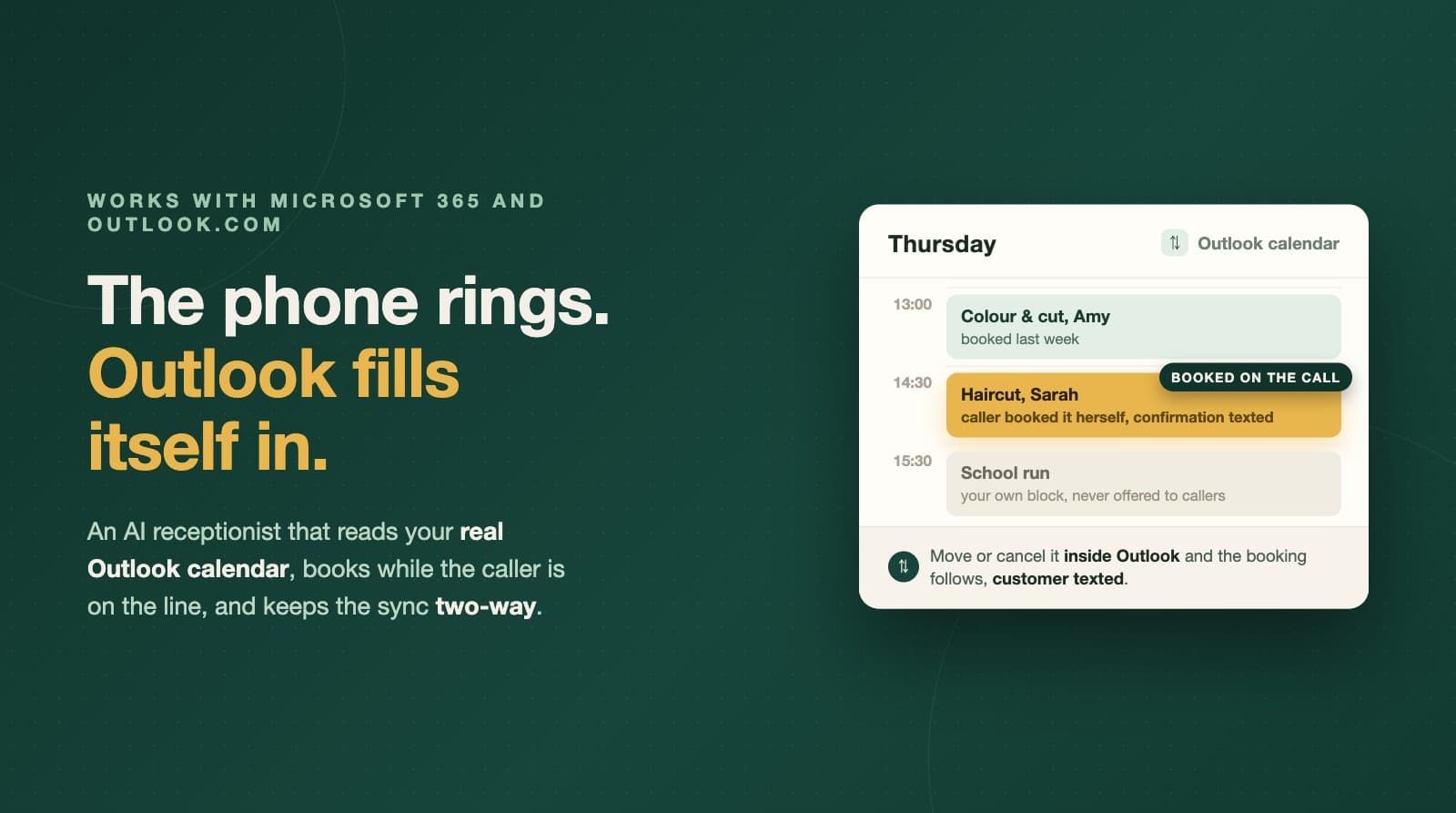
Most appointment software quietly assumes you run your life in Google Calendar. The connect button is Google, the screenshots are Google, the help docs are Google. If your business runs on Outlook, whether that is Microsoft 365 through work or a personal Outlook.com calendar you have had for years, you are used to being the afterthought.
This post is for you. It covers how an AI receptionist answers your business phone and books appointments directly into an Outlook calendar, what two-way sync actually means day to day, and what to check before you connect anything.
Why Outlook businesses get left behind by booking tools
There is a practical reason so many booking tools are Google-first: for a developer, the Google Calendar integration is the well-trodden path. Microsoft's calendar lives behind a different platform with its own sign-in, its own permissions, and its own way of pushing changes. Supporting it properly is real work, so plenty of products either skip it or bolt on a half-version that reads your calendar but does not write to it reliably.
That leaves a lot of UK businesses in an awkward spot. Trades firms whose office runs on Microsoft 365. Driving instructors whose diary has lived in Outlook since before smartphones. Salons where the owner books everything through the same account as their email. None of them should have to migrate their working life to Google just to stop missing phone bookings.
What an AI receptionist actually does with your Outlook calendar
Vocalenda answers your business phone 24/7 in a natural voice, and the calendar is not decoration, it is the whole point. During the call it:
- Reads live availability from your connected Outlook calendar, so it only ever offers slots that are genuinely free.
- Books the appointment while the caller is on the line. The event lands in your Outlook calendar before the call ends, not in a message pad for you to action later.
- Reschedules and cancels the same way. A customer who rings to move Thursday to Friday gets it done in the call, and your calendar updates itself.
- Texts the customer a confirmation from your business's own number, so the booking exists in writing on both sides.
You do not have to take any of that on trust: there is a live demo line on +44 7888 866273. Ring it, try to book a slot, and listen to what your callers would hear.
Two-way sync, in plain English
One-way integrations are where booking tools usually cut the corner: the software writes an event into your calendar and that is the end of the relationship. The problem shows up the first time you change something. You drag an appointment to a new time in Outlook, the booking system still believes the old time, and the customer turns up to a mess.
Vocalenda's sync is two-way for Outlook, the same as for Google. Edit a booking inside your calendar, move it, delete it, and the booking record follows, with the customer texted about the change. Your Outlook calendar stays the single source of truth, which is exactly how a diary should behave.
There is a quieter benefit here too. Because the receptionist reads your real calendar, everything you already put in it counts. Block out a dentist appointment or a school run in Outlook and those slots are simply never offered to callers. No separate availability screen to maintain, no second diary drifting out of date.
Mixed teams: Outlook for one person, Google for another
Real small teams are rarely uniform. The owner might live in Outlook because the business email is Microsoft 365, while the self-employed stylist who rents the second chair has years of history in Google Calendar.
Calendars in Vocalenda connect per person. Each staff member links their own account and picks their own provider, so an Outlook owner and a Google colleague can take bookings side by side, each in the diary they actually look at. Nobody migrates, nobody double-enters.
Setting it up
The honest version of the setup story is that the calendar connection is the shortest part of it:
- From the Vocalenda dashboard, choose Outlook on the calendar card and sign in with your Microsoft account. This is the standard Microsoft login page, and it accepts both work or school accounts (Microsoft 365) and personal Microsoft accounts, so a free Outlook.com calendar connects the same way as a company one.
- Grant calendar access when Microsoft asks. Vocalenda asks for calendar permissions to read availability and write bookings.
- That is the calendar done. The rest of onboarding, your services, opening hours and phone number, is the same whichever calendar you use.
If you ever switch providers, or a new staff member joins with the other one, it is a per-person setting rather than an account migration.
What this replaces
For an Outlook-based business, the alternatives usually look like one of these:
- A message-taking answering service. A human answers, writes down "Sarah wants a cut on Thursday", and you ring Sarah back between clients, checking Outlook manually. The call was answered; the booking still depends on you.
- Voicemail. For appointment calls, mostly a place where bookings go to die quietly.
- Booking links. Genuinely useful for the customers who want to self-serve, and no help at all for the ones who ring, which in trades, barbering and driving tuition is still a large share of real customers.
An AI receptionist that writes into Outlook itself closes the gap all three leave open: the phone call becomes a finished booking in your actual calendar, without you touching anything.
What to check before you connect any tool to your Outlook calendar
Whatever product you choose, these are the fair questions to ask of it:
- Is the sync two-way? If editing the event in Outlook does not update the booking and tell the customer, you will be the one doing that job forever.
- Does it book during the call, or take a message? A message still needs you to act on it.
- Does it handle reschedules and cancellations by phone? These are a big share of real appointment calls.
- Does it work per staff member? One shared calendar login is a compromise that shows quickly in a team.
- Does it confirm in writing? A text from your own business number closes the loop for the customer.
Vocalenda's answers to all five are yes, and the demo line above is the fastest way to check the part that matters most, what your callers actually experience. If you would rather see the pricing first, the plans are flat monthly amounts on the pricing page, with the calendar integration included whichever provider you use.
Common questions
Does an AI receptionist work with Outlook and Microsoft 365?
Yes. Vocalenda connects to your Microsoft account, reads live availability from your Outlook calendar, and books appointments into it while the caller is still on the phone. Work accounts on Microsoft 365 and personal Microsoft accounts both sign in through the standard Microsoft login.
Do I need a Microsoft 365 business subscription, or does a personal Outlook.com calendar work?
Either works. The connection uses Microsoft's standard sign-in, which accepts both work or school accounts and personal Microsoft accounts, so a sole trader running their diary on a free Outlook.com calendar connects the same way as a company on Microsoft 365.
What happens if I move or delete a booking inside Outlook?
The sync is two-way. If you drag a booking to a new time or delete it in your Outlook calendar, the booking record updates to match and the customer is texted about the change, so your calendar stays the single source of truth.
Can some staff use Outlook and others use Google Calendar?
Yes. Calendars connect per person, and each staff member chooses their own provider, so a mixed team where one person lives in Outlook and another in Google Calendar works without anyone switching.
Want more guides like this in your Google results? Add Vocalenda as a preferred source.
Add Vocalenda on Google